



Is Wireless Apple CarPlay® Standard on the 2026 Kia Sportage near Austin, TX?
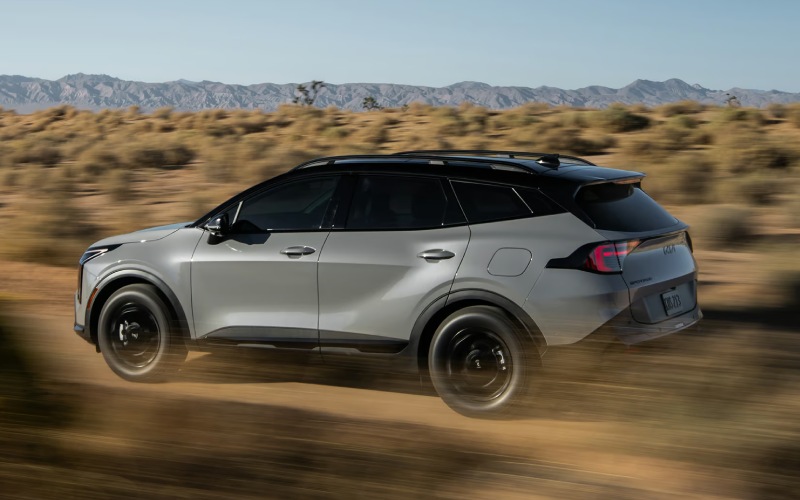
Ancira Kia – Is Wireless Apple CarPlay® Standard on the 2026 Kia Sportage near Austin, TX?
If you’re wondering if Wireless Apple CarPlay® comes standard on the 2026 Kia Sportage, the answer is yes; the 2026 Sportage comes standard with not only Wireless Apple CarPlay® but also Wireless Android Auto™ across the lineup, and that makes a real difference for drivers around Austin, TX. If your day takes you from a morning gym class at The Domain to a client meeting downtown and an evening pickup at AUS, leaving cords at home keeps your routine simple. At Ancira Kia, we want to show how the Sportage’s wireless integration works in everyday Austin driving, how it pairs with the available Dual Panoramic Display, and when you might still want to plug in.
Beyond convenience, going fully wireless means you get your favorite apps, maps, and music every time you start the engine — without fussing with the right cable. Pair it once, and your iPhone or Android device reconnects quickly on start-up. Combine that experience with the available approximately 24-in. Dual Panoramic Display and the intuitive 12.3-in. Touchscreen Display w/ Wireless Apple CarPlay® & Wireless Android Auto™, and the Sportage feels naturally connected the moment you set off on MoPac or I-35.
What “truly wireless” means in the 2026 Sportage
In the 2026 Sportage, “wireless” means you do not need a USB cable to run Apple CarPlay® or Android Auto™. After a quick initial Bluetooth and Wi-Fi handshake, your compatible smartphone projects its core apps to the touchscreen — navigation, calls, messages, podcasts, and more — and you control them through the display or voice. It is seamless, fast, and ready from the first stoplight outside your neighborhood.
Because this capability is standard, you do not have to hunt for a higher trim just to get rid of cords. You can then build on that foundation with available features that complement a cord-free cabin: the Dual Panoramic Display for expansive visibility, Harman Kardon® Premium Audio for richer sound, and Qi-enabled wireless smartphone charging to keep your battery topped up while you stream and navigate.
Real Austin drives that benefit from wireless
We hear from Austin-area shoppers who want tech that actually makes local driving easier. Here are a few everyday wins where the Sportage’s wireless setup shines.
- Downtown and UT parking: Glide into a spot and hop out without unplugging. The screen shuts down as you lock the doors — no cable to snag on the console.
- Stop-and-go on I-35: Keep your phone in the wireless charging pad while voice-guiding Maps or Waze runs on the display, so your battery does not suffer.
- Domain and Mueller errands: Short hops mean lots of starts and stops. The Sportage reconnects automatically, so your playlist or podcast resumes right where you left off.
- Hill Country weekend runs: Use your preferred map app for scenic routes, while the available Dual Panoramic Display keeps info clear at a glance.
- Austin-Bergstrom pickups: Toggle between airline apps and navigation on the touchscreen without digging for a cord in the cell phone lot.
Those are small moments, but together they add up to a calm, clutter-free drive — one more reason the Sportage feels built for Central Texas routines.
How to set up Wireless Apple CarPlay® or Android Auto™
Pairing takes just a minute or two, and you only need to do it once per phone. Here is the quick process we walk through with Austin shoppers during a test drive:
- Turn on your Sportage and make sure Bluetooth and Wi-Fi are enabled on your phone.
- On the 12.3-in. Touchscreen Display, select the phone projection tile and choose Apple CarPlay® or Android Auto™.
- Accept the Bluetooth pairing prompt on the car screen and then on your phone.
- Allow the requested permissions on your phone, including contacts and messages if you want hands-free calling and text dictation.
- For iPhone users, confirm the “Use CarPlay” prompt; for Android users, make sure Android Auto™ is enabled in your phone settings.
- That is it — your apps appear on the touchscreen, and the system will reconnect automatically on future drives.
Tip: Place your phone on the available Qi-enabled wireless smartphone charging pad to maintain battery while navigating and streaming. The charging indicator on the pad confirms a good connection, so you can keep your focus on the road.
Connected features that amplify the wireless experience
Sportage bundles more than just projection — it integrates convenient, confidence-building tech that rounds out a modern drive. These available features are especially handy around Austin’s busy corridors.
- Over-the-Air Updates: Keep your infotainment features current without a service visit — software updates download right to your Sportage.
- Voice Assistant: Pairing with Amazon Alexa helps you start the vehicle and set cabin temperature with voice commands through the Kia Access app.
- Find My Car: Use the Kia Access app to locate your Sportage when parking near Zilker or a festival lot gets crowded.
- Digital Key 2.0: Lock, unlock, and start the vehicle with your smartphone, and share access with up to three people in your household.
- Kia myQ Connected Garage: Control and monitor your garage door from the Sportage touchscreen — helpful when you are already rolling toward MoPac.
Balance that connectivity with driver assistance technology designed for real-world driving. Available Highway Driving Assist can help maintain a predetermined speed and distance from the vehicle detected ahead, Blind-Spot View Monitor can display a live view of rear blind spots in the gauge cluster, and the available 360° Surround View Monitor can simplify tight Austin garage maneuvers. Standard and available features like Auto Emergency Braking w/ Junction Turning Detection, Blind-Spot Collision-Avoidance Assist, and Rear Cross-Traffic Collision-Avoidance Assist further support everyday confidence.
When a cable might still make sense
Wireless projection is designed for daily convenience, but a cord can still be handy for certain use cases. If you are on a long road trip running high-draw apps, or you prefer the fastest possible charging speeds, plugging into a USB can deliver more consistent power than wireless charging. It is also a good fallback if you are in an area with unusual Wi-Fi interference. The key is choice — the 2026 Sportage gives you a clean, cable-free cabin by default and the ability to plug in whenever you want.
Frequently Asked Questions:
Do all 2026 Sportage trims include Wireless Apple CarPlay® and Wireless Android Auto™?
Yes. Wireless Apple CarPlay® and Wireless Android Auto™ are standard on the 2026 Sportage, so you can enjoy cord-free connectivity regardless of trim.
Will the Sportage remember two drivers’ phones and pick the right one automatically?
Sportage can store multiple devices. It typically reconnects to the most recently used phone when you start the vehicle. If both drivers are inside, a quick toggle on the touchscreen lets you select which device you want to project.
Does wireless Apple CarPlay® or Android Auto™ use my phone’s data plan?
Yes. Just like when you use these apps on your phone alone, wireless projection uses your phone’s data for maps, streaming, and live updates. The vehicle does not add data charges.
Will my phone battery drain faster when I use wireless projection?
Any active navigation, music streaming, or voice features will use some battery. The available Qi-enabled wireless smartphone charging pad helps offset that drain so you finish drives with more charge.
What if the connection drops while I am on MoPac or I-35?
The system is designed to reconnect quickly. You can also switch to the vehicle’s built-in radio or available navigation temporarily, then reselect Apple CarPlay® or Android Auto™ from the home screen once stable. Keeping your phone on the charging pad with the screen locked can help maintain a steady link.
Do I need to update the Sportage for new features over time?
With available Over-the-Air Updates, your Sportage can automatically receive eligible infotainment updates. We also recommend keeping your phone’s OS current for the best Apple CarPlay® or Android Auto™ experience.
Can I run smartphone navigation and still view vehicle info on the Dual Panoramic Display?
Yes. The available Dual Panoramic Display provides approximately 24 in. of combined screens, so your map can live on the main touchscreen while the driver display shows speed, driver assistance status, or turn prompts depending on settings.
The best way to see how well the 2026 Kia Sportage’s wireless tech suits Austin driving is to try it. Bring your phone to our showroom, and our team will pair it to a Sportage in minutes. Take a loop that includes a garage, a highway merge, and a few city turns — you will feel how the standard wireless experience, available Dual Panoramic Display, and thoughtful charging options simplify every mile.
Ancira Kia proudly serves in-market shoppers near Austin, TX from our San Antonio location. If you are comparing trims, want to test the available Harman Kardon® Premium Audio, or would like a hands-on walkthrough of Kia Connect features like Find My Car and Digital Key 2.0, our product specialists are ready to help. Schedule a test drive, and see how a cord-free cabin becomes second nature in the 2026 Kia Sportage.
0 comment(s) so far on Is Wireless Apple CarPlay® Standard on the 2026 Kia Sportage near Austin, TX?